Skip to content
Browserbase
    • Primitives
      • BrowsersCloud browsers for your agent to use the web
      • AgentsScale fully managed browser agents with simple prompts
      • SearchFind relevant websites from a single query
      • FetchRetrieve web data as agent-ready HTML, JSON, or markdown
      • RuntimeScalable, sandboxed environments for agent deployments
      • IdentityAuthenticate your agent to navigate the web like a human
      • ModelsUse any model with a single API key
      • ObservabilityUnified debugging your agent across replays, logs, and prompts
    • Open Source
      • Browse CLIGive your agent browsing skills with a single command
      • StagehandThe most popular AI browser automation framework
    • Use Cases
      • Browser AgentsPower agents across logins, forms, and portals
      • Web Data ExtractionAutomate data extraction from sites with no APIs
      • Records VerificationCheck KYB, background, and title from official sources
      • Portal FilingsFile registrations, pay invoices, and submit appeals at scale
      • Document RetrievalCollect receipts, statements, and reports from vendor portals
      • Data MigrationImport a new customer's data from the system they're leaving
      • Permissioned Data AccessSecurely access payroll, HRIS, and patient portal accounts your users authorize
      • AI AssistantsBuild agents that act on behalf of your users
      All use cases
    • Industries
      • AI & Agent Platforms
      • Healthcare
      • Fintech
      • GTM
      • Legal
    • Resources
      • Blog
      • Customers
      • Enterprise
      • Templates
  • Pricing
  • Docs
  • Log in
Log in
Sign up
Get a demo

November 4, 2026

Navigation Policies

Product Name
Browserbase
Category
Features

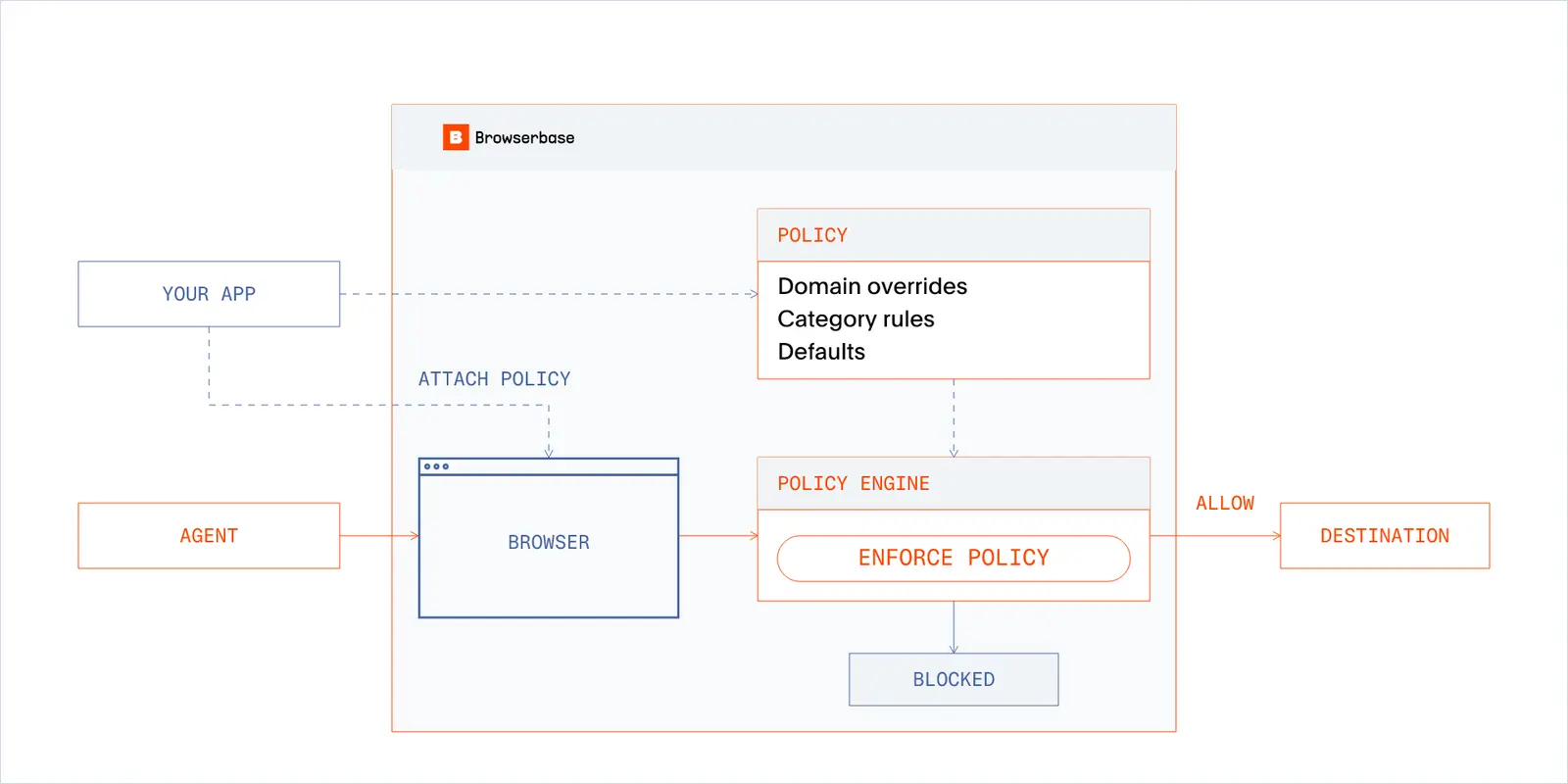
Control where your browser agents can go with Navigation Policies. Define which categories of sites to allow or block, add rules for specific domains, and reuse the same policy across sessions.

For example, a research agent can browse classified sites while blocking gambling, adult content, malware, and phishing sites. You can also choose how to handle unclassified domains. Domain overrides take priority over category rules and apply to subdomains, so you can make exceptions for sites your workflow needs.

Create a policy through the API, then pass its ID as browserSettings.riskPolicyId when starting a session. Browserbase checks page loads, iframe navigations, popups, and each redirect hop against that policy. Policy changes apply to new sessions; running sessions keep the policy they started with.

Contact support@browserbase.com to enable Navigation Policies for your project, then follow the setup guide to create your first policy.
Browserbase

Primitives

  • Browsers
  • Web APIs
  • Runtime
  • Identity
  • Model Gateway
  • Observability
  • Stagehand
  • MCP

Industries

  • AI
  • Healthcare
  • GTM
  • Tax
  • Legal

Developers

  • Docs
  • Templates
  • APIs & SDKs
  • Changelog
  • Status
  • Github

Company

  • Careers
  • Customers
  • Partner with Us
  • Trust & Security

Community

TwitterLinkedinYoutube
  • Privacy Policy
  • Terms of Service

Community

TwitterLinkedinYoutube
  • Privacy Policy
  • Terms of Service