Skip to content
Browserbase
    • Primitives
      • BrowsersCloud browsers for your agent to use the web
      • AgentsScale fully managed browser agents with simple prompts
      • SearchFind relevant websites from a single query
      • FetchRetrieve web data as agent-ready HTML, JSON, or markdown
      • RuntimeScalable, sandboxed environments for agent deployments
      • IdentityAuthenticate your agent to navigate the web like a human
      • ModelsUse any model with a single API key
      • ObservabilityUnified debugging your agent across replays, logs, and prompts
    • Open Source
      • Browse CLIGive your agent browsing skills with a single command
      • StagehandThe most popular AI browser automation framework
    • Use Cases
      • Browser Agents
      • Automated Testing
      • Workflow Automation
      • Web Data Extraction
      All use cases
    • Industries
      • AI & Agent Platforms
      • Healthcare
      • Fintech
      • GTM
      • Legal
    • Resources
      • Blog
      • Customers
      • Enterprise
      • Templates
  • Pricing
  • Docs
  • Log in
Log in
Sign up
Get a demo

Lead enrichment that actually scales

Static lists go stale, and the sources that would refresh them were not built for agents. Browserbase runs real browsers that enrich every lead in your CRM with fresh contact details, firmographics, and buying signals from the open web, under one API key. Trusted by 10,000 customers, including Ramp, Microsoft, and Lovable.

Get Started
Browser blocked by anti-bot protection

The Problem

Stale CRM data kills your pipeline

  • Records go stale within months: titles change, companies move, contacts leave.
  • Pre-packaged enrichment vendors return thin data that misses the long tail of public sources.
  • DIY scrapers break the moment a source adds anti-bot protection.
  • Logged-in sources lose their session every run, forcing repeated re-auth.
  • Enrichment runs serially, so refreshing a full CRM takes days instead of minutes.
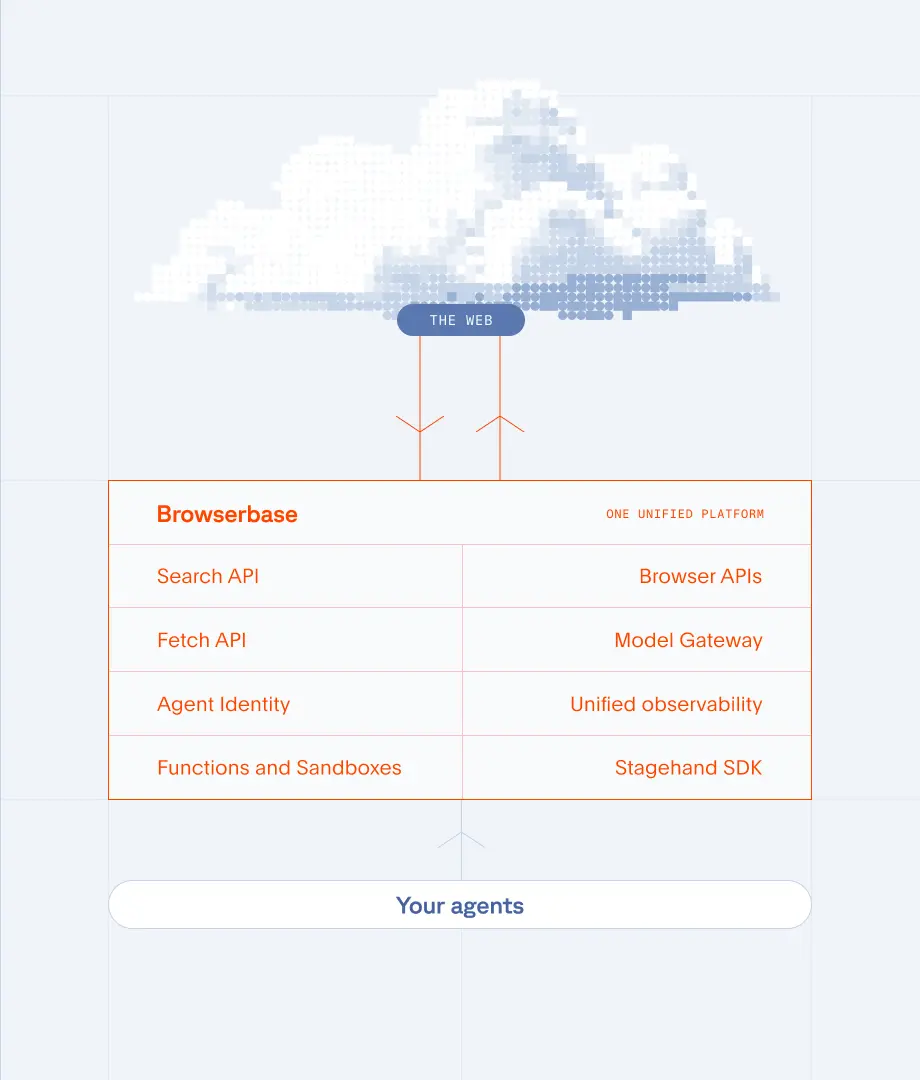
Browserbase platform diagram for lead enrichment

The Solution

How Browserbase powers lead enrichment

  • Real browsers: visit any public source the same way a person would, including JavaScript-heavy company pages and gated directories.
  • Verified: reach sources that turn away ordinary tooling, with managed CAPTCHA solving, so enrichment jobs finish instead of failing.
  • Agent Identity: Web Bot Auth signs your agent's requests, so sources can verify it instead of guessing.
  • Persistent contexts: stay logged in to gated portals across runs, so authenticated data flows on every refresh.
  • Parallel sessions: enrich thousands of records concurrently and refresh a full CRM in minutes.
  • Session replay: debug any enrichment run by watching exactly what the browser saw, no guesswork.

Data you can enrich

Contact details

Verified emails, phone numbers, current titles, and reporting lines pulled live from company pages.

Firmographics

Revenue, employee count, industry, tech stack, location, and parent company structure.

Buying signals

Job postings, funding rounds, leadership changes, product launches, and recent press.

Compliance data

Registry filings, NAICS codes, ownership records, and addresses for KYC and vendor checks.

Frequently Asked Questions

What is lead enrichment?

Lead enrichment is the process of adding fresh, accurate data to existing leads in your CRM so sales and marketing teams can prioritize, route, and personalize outreach. Enrichment typically covers contact details, firmographics, technographics, and real-time buying signals.

How is lead enrichment different from lead generation?

Lead generation finds new prospects you don't already know about. Lead enrichment improves the records you already have by filling in missing fields, refreshing stale data, and adding context like buying signals. Most go-to-market teams need both.

How do I enrich leads with public data sources?

Pre-packaged enrichment vendors only cover a fraction of the open web. Browserbase lets you build enrichment workflows that visit any public source: company websites, business directories, registries, news sites, and gated portals. Real browsers handle JavaScript, sessions, and Verified access, so the data flows reliably.

How does Browserbase avoid getting blocked during enrichment?

Browserbase runs real Chromium browsers with Verified access, covering fingerprint rotation, residential proxies, and managed CAPTCHA solving, so enrichment jobs reach the data instead of bouncing off a block page. Agent Identity adds Web Bot Auth signed requests, so sources can verify your agent instead of guessing.

Can I plug Browserbase into HubSpot, Salesforce, or Clay?

Yes. Browserbase exposes a simple API and SDKs for TypeScript, Python, and more. Trigger an enrichment run from any workflow tool, webhook, or scheduled job, then write results back to your CRM, data warehouse, or enrichment orchestrator.

How fast can I enrich a full CRM?

Browserbase supports parallel browser sessions on demand, so enrichment scales horizontally. Teams routinely refresh tens of thousands of records in a single run by fanning out across concurrent browsers.

What will you build?

Get StartedGet Started
Browserbase

Primitives

  • Browsers
  • Web APIs
  • Runtime
  • Identity
  • Model Gateway
  • Observability
  • Stagehand
  • MCP

Industries

  • AI
  • Healthcare
  • GTM
  • Tax
  • Legal

Developers

  • Docs
  • Templates
  • APIs & SDKs
  • Changelog
  • Status
  • Github

Company

  • Careers
  • Customers
  • Partner with Us
  • Trust & Security

Community

TwitterLinkedinYoutube
  • Privacy Policy
  • Terms of Service

Community

TwitterLinkedinYoutube
  • Privacy Policy
  • Terms of Service